
To get started, navigate to Pages > Add Page. If this option is unavailable, contact your site administrator to request the necessary permissions. How to Create Roles and Permissions for Users

Fill in the following details.
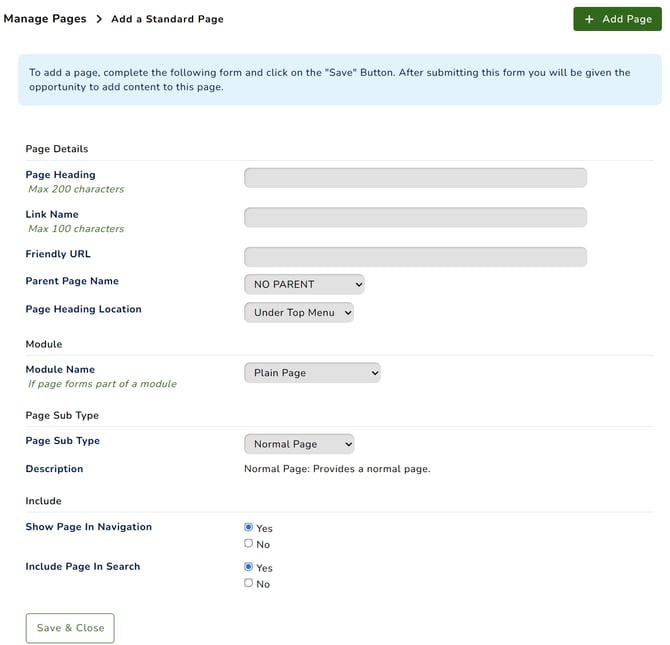
- Page Heading: The heading displayed at the top of the page.
- Link Name: The name displayed in your website navigation.
- Friendly URL: A readable, memorable URL that can also support SEO.
- Parent Page Name: Select a parent page to nest under, or choose No Parent for a main page.
- Page Heading Location:
- Under Top Menu: The page heading background matches the header background colour.
- With Content: The page heading background matches the main content background colour.
- Module Name: Select a module if needed. Only one page can be assigned to each module as its landing page. Use Page Widgets to display specific sections of module content on other pages. Page Widgets
- Page Sub Type: Choose the page type:
- Navigation Node: A navigation heading with expandable child links.
- Link Page: A navigation link to an external page.
- Normal Page: A standard page containing content.
- Show Page In Navigation: Choose whether the page appears in your website navigation.
- Include Page In Search: Choose whether search engines can index the page. Select No to prevent it from appearing in search results.